Source: chrischabot/typescript-bash-tools.
Field entry, 7 May.
There is a peculiar category of tools that become invisible because they work too well. cat, rg, sed, jq, wc, diff, tar, curl, git: none of these feels like product surface when a developer is using them. They feel like the table under the work.
Coding agents inherited that table. They learned an enormous amount of software practice through shell transcripts, READMEs, CI logs, Stack Overflow answers, install scripts, and the small legal fictions by which engineers persuade computers to list, filter, patch, count, and move things. Ask an agent to investigate a codebase and it does not usually begin with a grand theory of software comprehension. It reaches for rg, opens files, narrows a suspect list, reads the nearby tests, and builds a little trail of evidence one command at a time.
That works beautifully until the agent is not actually sitting in a Unix environment.
Hosted agents, browser agents, TypeScript runtimes, Cloudflare Workers, and sandboxed shells all run into the same awkward fact: the model knows the move, but the host may not have the instrument. A real binary may be missing, too slow to start, too dangerous to expose, too platform-specific to trust, or simply outside the runtime. The easy answer is to tell the agent to stop thinking in shell. The better answer is to notice that the shell is not only a process. It is a vocabulary of small operations that compose under pressure.
typescript-bash-tools is an attempt to preserve that vocabulary inside TypeScript. It is not trying to make a laptop out of a Worker. It is trying to give a TypeScript-native agent enough of the ordinary command line that its learned habits remain useful without every small action becoming a host escape.
What it is
The package is, in the plainest terms, a registry of TypeScript implementations for the commands coding agents keep reaching for. The current source registers roughly 270 command definitions, from the usual file and text tools through data formats, archives, developer utilities, network probes, media inspection, and a few runtime-specific commands for previewing and deploying code.
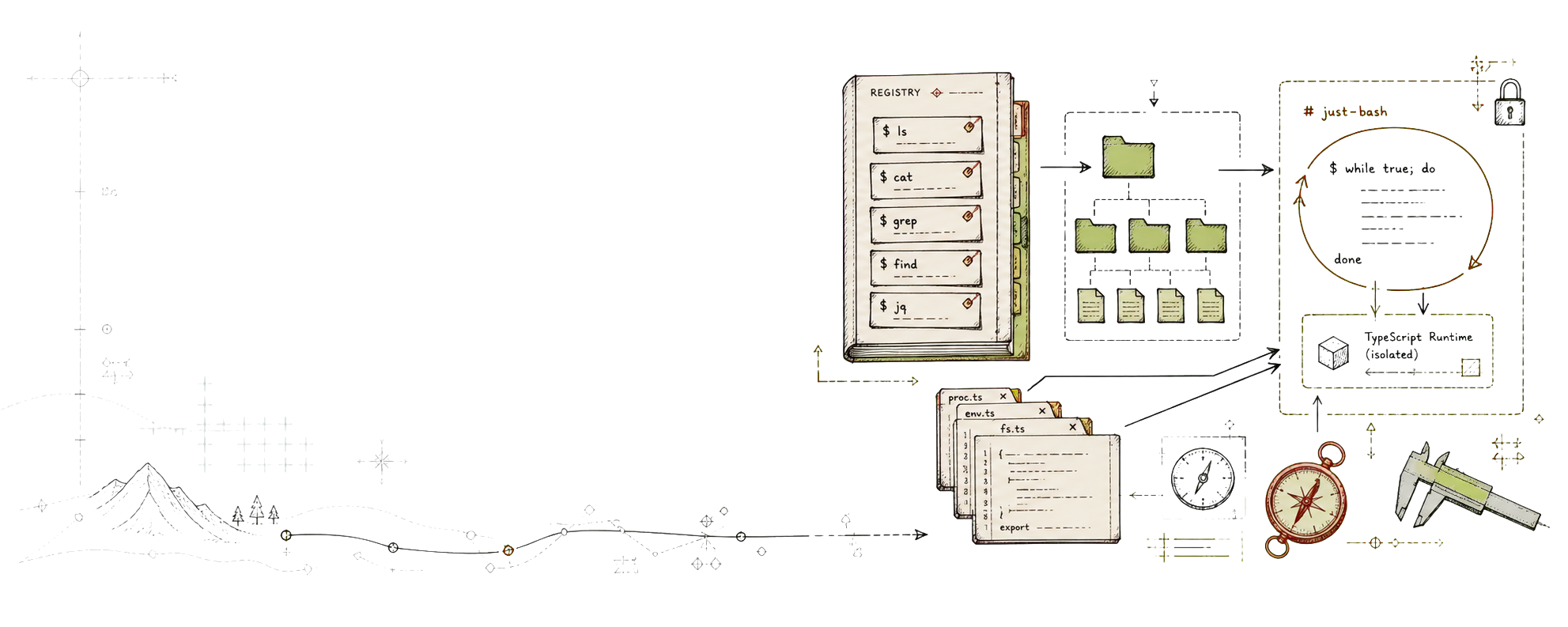
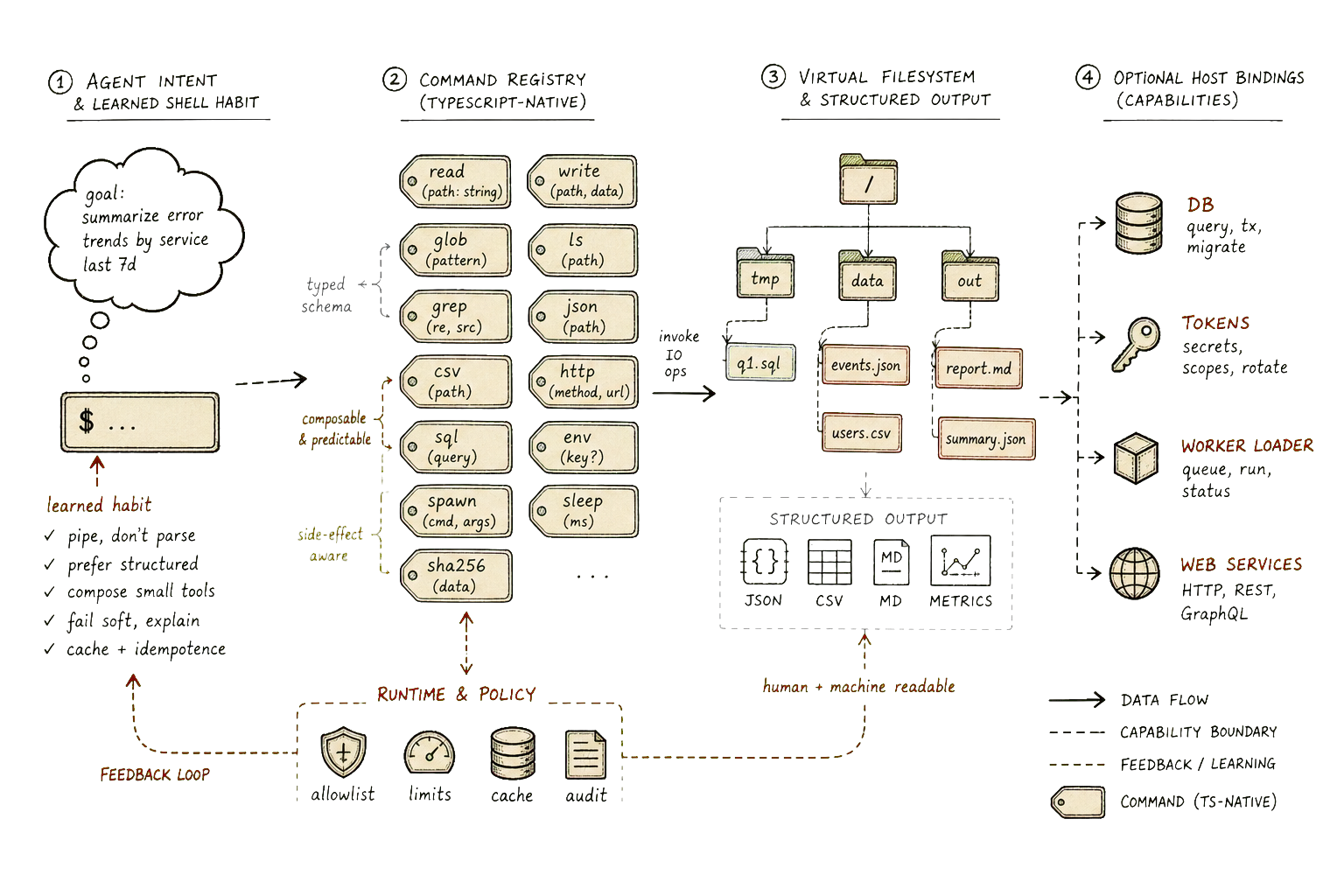
The shape is deliberately modest. Each command exports a CommandDefinition: a name, description, category, usage string, examples, and a factory. The factory receives a small set of runtime dependencies and returns the handler that just-bash can execute. BashCommandRegistry collects those definitions, rejects duplicate names, exposes lists and categories for help text, and builds the final custom command array with defineCommand.
That sounds like plumbing because it is. The important product decision is hidden inside the plumbing: commands are self-describing, bounded, and late-bound to their host. They do not directly own the environment. They receive an Env, a compatibility date, optional user and session identifiers, optional Cloudflare tokens, an optional durable workspace, and an optional workspace API. In other words, pure local behavior can stay pure, while host-shaped behavior has to cross an explicit boundary.
That boundary matters. A native wc or sort should not need to know whether the application running it has a database. A browser or deploy adapter probably does. By making that distinction part of the registry contract, the project avoids turning “bash tools” into a bag of privileged callbacks with familiar names.
The useful illusion
The illusion this project creates is not that every Unix command exists. It is that the common loop still holds.
An agent can list files, search text, inspect JSON, split lines, patch a file, compare output, check a hash, look at a process-ish report, or ask for a preview without the host first granting it a real shell. The implementations operate over just-bash’s virtual filesystem, which means the work can happen inside an in-memory or persisted workspace rather than on the machine’s actual disk. That is a small distinction with large consequences: the commands can be fast, inspectable, resettable, and much easier to reason about than arbitrary subprocesses.
The exact set is less interesting than the distribution. Filesystem commands cover the “where is it?” phase. Text commands cover the “what changed?” phase. JSON, YAML, XML, HTML, CSV, SQLite, DuckDB, and jq-shaped tools cover the “what does this structure say?” phase. Archives, hashing, media, formatting, linting, and security probes cover the long tail that real agent sessions produce the moment they stop being tidy examples.
This is where the project feels less like a compatibility layer and more like an agent workbench. It has rg and grep because agents search constantly. It has jq because structured output is where agents stop squinting at prose and start using evidence. It has diff, patch, delta, and difftastic because code changes need to be compared in the language of changes, not vibes. It has the boring commands because boring commands are the ones that keep the investigation honest.
Fidelity with a purpose
The danger in reimplementing shell tools is that one can spend the rest of one’s natural life discovering flags. Unix utilities are not small so much as old, social, and barnacled by reasonable people making reasonable requests across several decades. A perfect clone is not a product plan. It is a weather system.
typescript-bash-tools takes the more useful position: implement the paths agents actually use. That does not mean the commands can be sloppy. A fake jq that only handles the demo case is worse than no jq, because it teaches the agent to trust a surface that collapses as soon as the task becomes interesting. But fidelity should follow leverage. The source reflects that tradeoff. Some commands are thin and direct. Others, like jq, carry a surprisingly large subset of the real language: field access, pipes, object and array construction, conditionals, try/catch, selectors, mapping, grouping, path operations, encoders, and raw or compact output.
The media commands are a good stress test because they refuse to be solved by string manipulation with optimism. ffmpeg-video-inspect reads bytes from the virtual filesystem, parses container metadata, and reports codec, resolution, duration, frame rate, and audio information. It is not pretending to be the full ffmpeg binary. It is capturing the particular thing agents often need: inspect this file, tell me what it is, and give me structured output when I ask for it.
That pattern appears throughout the project. The useful question is not “could a human power user replace their shell with this?” The useful question is “can an agent continue its investigation without leaving the TypeScript runtime for the next ordinary step?” Those are different questions, and confusing them is how a practical tool becomes an unfinishable tribute act.
Host work stays explicit
The runtime commands are the strangest part, and therefore the most revealing. run, preview, and deploy collect files from the virtual filesystem, ensure a package shape exists, bundle TypeScript or JavaScript with @cloudflare/worker-bundler, and execute or cache the result through an injected dynamic worker loader when the host provides one.
That is not bash in the traditional sense. It is the same shell habit extended into an agent-native loop: write a file, run it, observe the output, adjust the file, preview the service, smoke-test the route. The important part is not that the command has a familiar name. The important part is that the agent gets a short evidence loop without needing a full host environment for every attempt.
The implementation also keeps the promise honest. A command that needs deps.env.LOADER has to ask through Env. A command that needs a workspace adapter receives one. A command that needs tokens sees named tokens, not a magic ambient authority. This is the difference between a tool surface and a permission leak wearing a helpful hat.
There is, of course, still trust involved. A TypeScript command registry can be safer than arbitrary shelling out and still contain bugs, incomplete flags, incorrect edge cases, or surprising differences from the real utility. But those differences live in code the agent can inspect. That is a better class of problem than a missing binary, a platform-specific subprocess, or a shell escape that only works on the maintainer’s machine.
Why this matters for agents
Agents do not become reliable because they are denied tools. They become reliable when tools are small enough, explicit enough, and observable enough that each action produces useful evidence.
That is the quiet argument inside typescript-bash-tools. The shell is a superb interface for incremental investigation, but a real shell is also a very large authority boundary. Rebuilding the common command set in TypeScript does not remove the need for permissions, validation, or tests. It moves many ordinary operations into a space where the host can control the filesystem, inject only the services it means to expose, and keep the outputs close to the agent’s working loop.
The project also admits something important about model behavior: agents are already fluent in command-line practice. The question is not whether to erase that fluency and replace it with a brand-new API for every task. The question is where to let that fluency run. If the answer is “only inside a real machine shell,” hosted agents inherit all the mess and risk of that shell. If the answer is “inside a TypeScript registry over a virtual filesystem, with explicit host bindings where needed,” the same habits become much easier to contain.
That is not as romantic as a terminal window. Good. The terminal window was never the point. The point was the sequence of small, inspectable moves: search, read, transform, compare, run, observe, correct.
The trick is keeping that sequence alive when the shell itself is no longer invited into the room.